


wX
4.5581.00 Reviews
App Specs
- Version
- 55990
- Updated On
- License
- Free
- Downloads
- 50,000+
- Developer
- Joshua Tee
- Categories
- Weather
- Platform
- Android
Screenshots
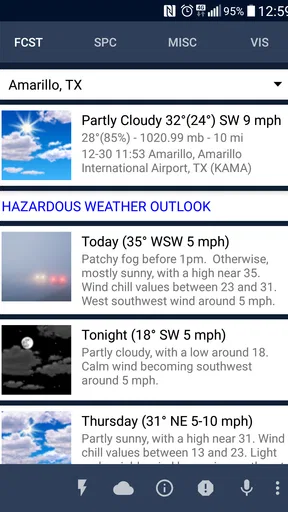
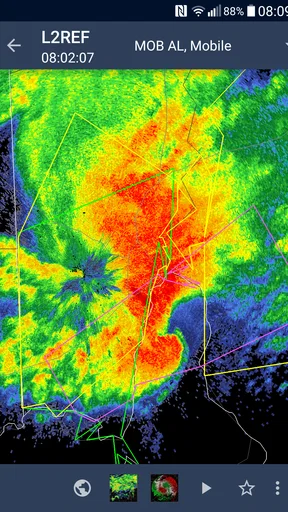
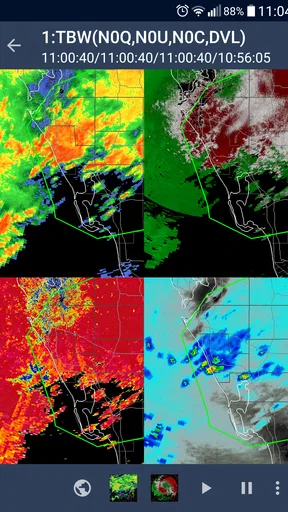
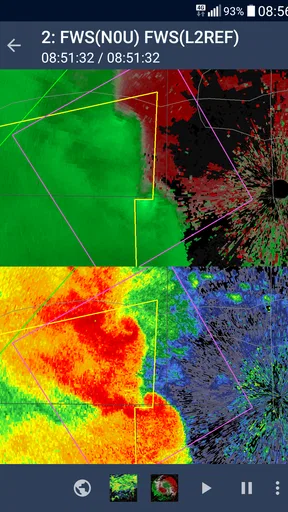
 Analysis by AppCompare
I like weather apps that show more than a cheerful sun icon, and wX is clearly built for people who want to inspect the atmosphere rather than simply check whether to carry an umbrella. Developed by Joshua Tee, this free weather app focuses on advanced US weather information, bringing radar, forecast models, satellite imagery, observations, and specialist outlooks into one technical workspace. My impression is that it can be extremely useful once its logic becomes familiar, but it does not behave like the usual quick-glance forecast app.
The first thing to understand is the audience. wX is aimed at weather-curious users, storm watchers, outdoor planners, and anyone who wants to compare several kinds of evidence before making a decision. It is available for Everyone, has reached over 50 thousand installs, and holds a 4.5 average from roughly 992 ratings. Those figures suggest a focused but active community rather than a mass-market audience. I would recommend it to someone who enjoys looking at radar loops and model guidance; I would not automatically recommend it to a person who only wants a simple current temperature and a notification for tomorrow morning.
Learning where the useful information is
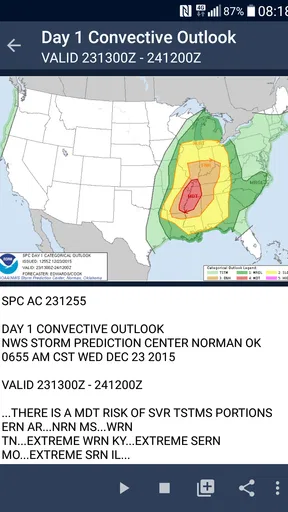
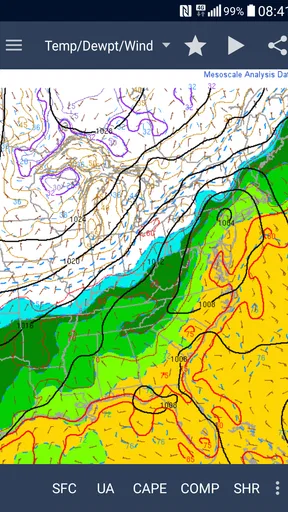
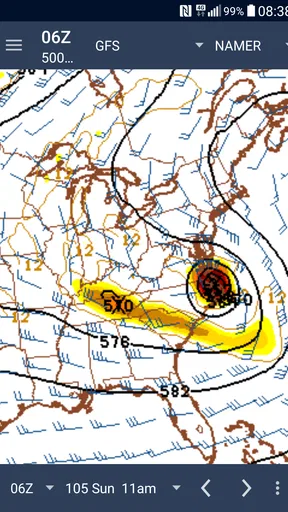
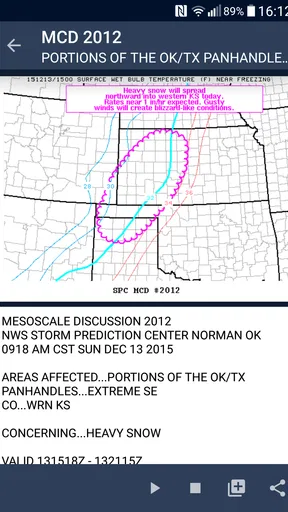
Most of the friction comes from the app’s depth, not from a lack of weather material. The short store label is simply “wX,” while its longer summary points toward radar, models, visible satellite imagery, observations, and outlook products from organizations such as the SPC, WPC, and NHC. That combination tells me the app is designed more like a compact analysis tool than a polished lifestyle dashboard. The reward is control, but the cost is that a first-time user may need to explore before knowing which screen answers a particular question.
For example, if I am deciding whether to drive across town, I do not need every available layer. I want a current observation, a radar view, and perhaps a short look ahead. If I am watching a developing storm, the useful path is different: radar motion, satellite context, and official severe-weather guidance become more valuable. Treating every screen as equally important makes the app feel busy. Choosing one question first makes it much easier to use.
That is one of the app’s less obvious strengths: it encourages evidence-based checking. Instead of accepting one forecast number as the whole story, I can compare what is happening now with what different model views suggest later. This is especially helpful when conditions are changing quickly or when a standard forecast seems too vague for the decision I need to make.
The trade-off is interpretation. Radar shows precipitation and its movement, but it is not a guarantee that rain will fall directly on my street at a precise minute. Satellite imagery gives valuable cloud and storm context, while observations describe conditions at reporting locations rather than every point between them. Model output is guidance, not a promise. wX puts these tools close together, but it does not remove the need for sensible reading.
Why the first session can feel harder than expected
People coming from a conventional weather app may look for a large current-condition card, a simple hourly strip, and a single alert setting. wX’s appeal lies elsewhere. Its information is more useful when I actively choose a layer or product, which means the app may initially feel less welcoming than an app designed around instant summaries.
Worth Reading Before You Choose

Flipboard Shows What News Apps Must Do Beyond the Feed

Switching to Android Auto Means Rethinking Your Driving Routine

Google Calendar Makes a Crowded Week Easier to Manage

Ludo King Makes the Most of the Minutes Between Plans

Baby Panda World Brings Quick Play to Modern Phones, but Its Game Library Feels Busy

ESPN’s Live Game View Makes Following Close Games Easier
I found it helpful to begin with one repeatable task instead of trying to understand the entire interface. I might open radar before leaving home, check observations when deciding whether the displayed conditions match reality, or use satellite imagery when radar alone does not explain what the sky is doing. After that routine becomes familiar, the broader collection of tools feels less like clutter and more like a set of shortcuts.
A second practical insight is to separate “what is happening” from “what may happen.” Observations and radar help with the present; model views and official outlook products help with the future. Mixing those roles can lead to confusion, especially when a forecast model appears calm while current radar already shows activity. Using each source for its proper job is one of the easiest ways to get better results from the app.
Setup checks that prevent avoidable confusion
wX runs on Android with a minimum operating system requirement of Android 10. That is worth checking before troubleshooting anything more complicated. If the phone is running an older system, installation or normal operation may be the real obstacle, and changing app settings will not solve it. The current version is 55990, so I would also make sure the installed copy is current before assuming that a display problem is unique to my device.
Because this is a weather app centered on US products, location and regional expectations matter. A user in the United States can make direct use of the app’s intended weather sources and outlook context. Someone elsewhere may still find parts of the interface interesting, but the experience is not necessarily comparable to a local weather service designed around their country’s radar network, warnings, and forecast offices. This is an important reason to skip it if the main goal is dependable local coverage outside its core focus.
When a map or product appears empty, I would start with the basics: check that the phone has a working connection, confirm that the selected location or area is sensible, and try a different weather layer. A blank result in one view does not automatically mean the whole application is broken. Weather products can differ in coverage, update timing, and geographic usefulness, so switching from a specialized layer to a broader one can reveal whether the issue is local to that product.
I would also avoid changing several things at once. If I clear settings, change the location, switch products, and reinstall immediately, I lose the ability to identify the actual cause. A better sequence is simple: reopen the app, test the same view on a stable connection, try another product, then restart the phone if the behavior continues. That kind of methodical check is more useful than repeatedly tapping the same screen.
How I would prepare it for a daily routine
My preferred setup would be built around two or three recurring checks. Before commuting, I would inspect current observations and radar. Before an outdoor activity, I would compare the near-term picture with a model view rather than relying on one isolated forecast impression. During a storm, I would use radar and official outlook material, remembering that the app is a source of information and not a substitute for urgent local instructions.
This approach also keeps the app from becoming overwhelming. I do not need to study every available product every morning. wX becomes more practical when I treat it as a toolbox: open the tool that matches the question, interpret it in context, and close the app when the decision is made.
Another useful habit is to compare an unusual reading with nearby observations rather than assuming the phone or app is wrong. A single station may not represent the conditions at my exact location. If the local sky, radar, and nearby reports tell different stories, that disagreement is itself useful information: weather can vary sharply over a small distance, and the app is showing separate pieces of that picture.
Recovering a workflow when a view seems wrong
One of the most frustrating moments with an advanced weather app is opening a familiar product and seeing something that appears outdated, incomplete, or irrelevant. My first response would be to identify whether the problem is the display, the selected product, or the underlying weather situation. If radar is not helpful, I would compare it with observations. If satellite imagery looks unclear, I would check whether the cloud pattern is simply difficult to interpret at that moment. If a model view disagrees with current conditions, I would remember that it is a forecast tool rather than a live sensor.
A particularly useful recovery technique is to move from broad to specific. Start with the general map or current regional picture, then narrow the view only after confirming that the app is showing the right area. This reduces the chance of mistaking an empty or quiet region for a loading failure. It also helps when a user has opened a specialist product that is not relevant to the immediate question.
If the app appears stuck, I would close and reopen it, then test another screen. If every screen behaves poorly, the connection or device may be involved. If only one product fails while other views work, the issue is more likely tied to that particular source or update cycle. This distinction matters because reinstalling an app cannot repair a data source that is temporarily unavailable or a product that simply has limited coverage for the chosen area.
The most important workflow tip is not to use a single layer as a verdict. Radar can help me judge movement, but observations can tell me whether the expected precipitation is reaching the ground. Satellite can reveal broader cloud structures that radar does not show in the same way. Official outlooks can add context for severe-weather risk. The app’s real value appears when I use these views together, not when I search for one magical screen that answers everything.
When an apparent app problem is actually a weather-data limitation
Weather information is inherently uneven. A map may look quiet because precipitation is outside the selected area, because the event is between updates, or because the relevant phenomenon is better represented by another product. A model can be useful while still missing the exact timing of a local shower. An observation can be accurate for its station while feeling wrong a few miles away. These are limitations of interpreting atmospheric data, not necessarily faults in wX.
This is where the app demands more patience than a mainstream alternative. A typical consumer forecast app may smooth everything into a clean sentence such as “rain later.” That is easier to read, but it hides uncertainty. wX exposes more of the underlying picture, which gives me more control and also more responsibility. If I want a quick answer with minimal interpretation, the simpler option may genuinely be better.
For safety decisions, I would treat official warnings and local emergency guidance as the priority. wX can help me understand radar, observations, and specialist outlook products, but I would not use any weather app as permission to ignore an official instruction. This is especially important when a user is trying to decide whether to travel during a dangerous event.
Who should use wX, and who should choose something simpler?
I see wX as a strong fit for US users who enjoy weather analysis and want several advanced sources in one place. Storm watchers can benefit from having radar, satellite imagery, observations, and outlook products close at hand. Outdoor users who are comfortable checking conditions themselves may also appreciate the ability to investigate a changing situation rather than accepting one generalized forecast.
It is less suitable for someone who wants a completely passive experience. If my ideal weather app is one that opens with a large temperature, a friendly illustration, and a short sentence telling me what to wear, wX may feel like work. It is also not the obvious choice for users whose main weather needs are outside the US, where local services may provide more relevant warnings and region-specific products.
The free price makes experimentation easy, and the Everyone age rating removes an obvious barrier for families or younger weather enthusiasts. Still, “free” does not mean effortless. The time investment is learning how the information is organized and deciding which products are worth checking. For me, that is a fair exchange, but only if I actually want the extra detail.
Compared with ordinary forecast apps, wX gives up visual simplicity in exchange for analytical range. Compared with a dedicated radar app, it can be more useful when I want radar alongside models, satellite imagery, observations, and official outlook material. The best alternative depends on the job: a simple forecast app wins for speed, a local warning-focused service may win for regional alerts, and wX wins when I want to investigate the weather myself.
My practical verdict after using its deeper approach
The best way to use wX is as a weather toolbox, not as a one-tap forecast. Once I stop expecting a conventional dashboard and start matching each view to a specific question, the app becomes much more convincing. Its collection of advanced US weather resources gives it genuine depth, especially for users who want to compare current conditions with broader atmospheric guidance.
There is a learning curve, and that should be part of the buying decision even though the app costs nothing. The interface can feel dense, specialist products may need interpretation, and a confusing result can require checking the connection, location, selected layer, and source context before blaming the app. Those are real points of friction, not reasons to dismiss it.
Joshua Tee’s app is currently at version 55990 and has been available since September 28, 2015, which gives it the feel of a long-running specialist utility rather than a disposable novelty. I would install it if I wanted to understand storms, compare weather evidence, or build a personal checking routine around radar and official products. I would skip it if I only needed a polished daily forecast with almost no decisions to make.
My recommendation is therefore conditional but positive: give wX a few deliberate sessions, begin with one practical workflow, and resist the temptation to open every layer at once. If you enjoy learning what the weather is doing and why, it offers far more substance than a standard forecast screen. If you want weather reduced to one effortless answer, another app will probably serve you better.
Pros
- Simple interface that is easy to understand for first-time users.
- Runs smoothly on most modern Android and iOS devices.
- Useful features are organized for quick access.
- Regular updates can improve stability and add new functionality.
- Lightweight design helps reduce storage and battery usage.
Cons
- Some features may require an account or additional permissions.
- The free version may include advertising or usage limitations.
- Performance can vary on older or less powerful devices.
- Certain options may be difficult to find without exploring the app.
- An internet connection may be needed for the best experience.
FAQs for wX
What is wX and what can users do with it?
wX is an application designed to provide its core features through a mobile-friendly interface. Before downloading, users should review the app’s description and supported functions carefully, since the available tools, content, and user experience may vary by device and operating system. Checking recent screenshots, permissions, and update notes is also recommended to confirm that it meets your expectations.
Is wX free to download and use?
The download price and available features may depend on the platform, region, and version of wX. Some applications are free to install but may include advertisements, optional purchases, subscriptions, or restricted premium tools. Users should check the official Google Play Store or Apple App Store listing before installing and review the payment terms carefully, especially if a free trial or recurring subscription is offered.
What permissions does wX require?
The permissions requested by wX can differ according to the device and the features being used. Common requests may include access to storage, notifications, the camera, microphone, location, or an internet connection. Before accepting, users should read each permission prompt and decide whether it is necessary. Permissions can usually be reviewed or changed later through Android or iOS privacy settings.
Is wX compatible with Android and iOS devices?
Compatibility depends on the version of wX available in your country and the operating system installed on your phone or tablet. Users should verify the minimum Android or iOS requirement, supported device models, and available storage before downloading. Keeping the operating system updated can improve stability, although older devices may not support every feature or the latest version of the application.
Is wX safe to download and does it protect user data?
For safety, download wX only from its official Google Play Store or Apple App Store listing rather than from unknown websites or modified installation files. Before creating an account or sharing personal information, review the developer details, privacy policy, data-safety section, and recent user reviews. No app should be assumed completely risk-free, so users should keep their device updated and use strong account security.


